Posts

User Testing

User testing is a great way to discover problems with your website or app. And to increase empathy with your users.   But how does it work? Why is it such a valuable method? And which type of user testing can you use in which situation?  You ask a number of people to perform a number of  typical tasks  on your website or intranet. Or on a mock-up if you're in the process of building a new one.   The test is performed  on an individual basis. So it’s not like a focus group where there's a bunch of people giving you feedback all at once.  Please,  don't ever call a focus group a user test .  The test participant should belong to your  target audience . Recruit for engagement, not demographic representation. Ideally, the test participants are existing or potential clients.   Everything the test participant does and says is  recorded. That way you and your team c...

How to install wordpress

Image
Install WordPress Di Localhost Siapkan file WordPress terbaru yang dapat didownload langsung di  WordPress.org . Buka folder XAMPP di komputer Anda. Kemudian buka folder  htdocs . Copy-kan file WordPress ke dalam folder ini. Lebih mudahnya, silahkan buka Windows Explorer, lalu ketikkan  C:\xampp\htdocs  pada bagian  folder address  seperti terlihat pada gambar di bawah ini. *) NB: Folder  htdocs  merupakan folder yang dipakai untuk menaruh file-file yang bisa dibuka di browser. Jika kita menaruh selain di folder ini, maka browser tidak akan bisa membukanya. Apabila file masih dalam bentuk compress, silahkan ekstrak terlebih dahulu. Default folder hasil ekstrak bernama  ‘wordpress’.  Anda bisa merubah nama wordpress menggunakan nama lain dan pada panduan ini kami contohkan dengan menggantinya dengan nama  ‘blogku’ . Bila diakses, hasilnya akan terlihat seperti gambar di bawah ini: Sekarang bukalah b...

Artificial Intelligence (AI)

Mesin yang mampu berpikir, menimbang tindakan yang akan diambil, dan mampu mengambil keputusan seperti yang dilakukan oleh manusia. Kecerdasan Alami  Cepat mengalami perubahan  Tidak mudah diduplikasi / disebarkan  Lebih mahal  Bisa berubah  Sulit didokumentasikan  Lebih lambat Kecerdasan Buatan  Permanen  Lebih mudah diduplikasi dan disebarkan  Lebih murah  Konsisten  Dapat didokumentasikan  Lebih cepat Soft Computing Kumpulan teknik-teknik komputasi dalam ilmu komputer, yang berusaha untuk mempelajari, memodelkan, dan menganalisis suatu fenomena tertentu guna mengeksploitasi adanya toleransi terhadap ketidaktepatan, ketidakpastian, dan kebenaran parsial untuk dapat diselesaikan dengan mudah, robustness, dan biaya penyelesaian murah.

Lumen Framework Laravel

Image
Mengapa menggunakan lumen? Karena lumen memberikan response service dengan cepat. Web service  menyediakan layanan namanya API gunanya untuk menghubungkan server dengan client. Client harus mengkonsumsi api dr Web service supaya terhubung dengan server. Hasil atau keluaran lumen berupa file Json. Penjelasan dari screenshot diatas : Pada file .env di lumen akan di isi nama database yang  di gunakan, host database serta username dan password. Dari sc diatas DB_HOST=188.166.221.184 DB_PORT=3306 DB_DATABASE=pantaujuma DB_USERNAME=pantaujumadev DB_PASSWORD=pantaujuma123*() Kemudian mengerjakan Controller : a.        Mengambil data dari database: public function getAllPupuk()     {           $allPupuk = DB::select('select hashPupuk,nama,jenis, deskripsi from pupuk');             ...

FXML

Image
JavaFX application is divided hierarchically into three main components known as Stage, Scene and nodes. We need to import  javafx.application.Application  class in every JavaFX application. This provides the following life cycle methods for JavaFX application. public void init() public abstract void start(Stage primaryStage) public void stop() in order to create a basic JavaFX application, we need to: Import  javafx.application.Application  into our code. Inherit  Application  into our class. Override  start()  method of Application class. Stage Stage  in a JavaFX application is similar to the  Frame  in a Swing Application. It acts like a container for all the JavaFX objects. Primary Stage is created internally by the platform. Other stages can further be created by the application. The object of primary stage is passed to  start  method. We need to call  show  method on the  primary stag...

Create a desktop application using h2 (embedded) Days 2

Image
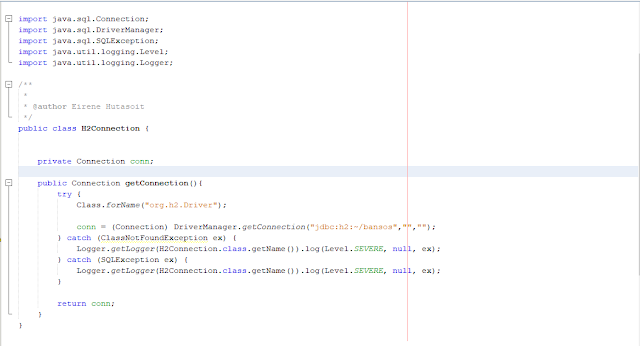
C. CONNECTION Source code : As a example here the explanation :  "jdbc:h2:~/bansos","","" Driver name when we insert the J DBC URL is bansos. And the first Quotation marks belongs to username and the second belongs to password.

Create a desktop application using h2 (embedded)

A. MAKE A NEW PROJECT 1. First, create new project using  netbeans 2. Choose Java Fx category 3. Choose Java Fx Application and write the project name 4. You can deselect box of Create Application task 5. And Finish. B. MAKE H2 DATABASE 1. Click the Services Window 2. Right click in Drivers 3. And then add the driver file ( h2.jar). 4. After add h2.jar,  Name of driver will automated fill "H2 Database Engine" 5. Then click OK 6. Right click in Databases and choose new Connection 7. Choose Driver H2 Database Engine in dropdown list 8. Then insert h2.jar and next. 9. Insert username and password ( this is optional ) 10. Insert JDBC URL (jdbc:h2:~/(name of database)) example : jdbc:h2:~/Javafx 11. We can Test Connection with Click the button. 12. If it succesfull there is a alert " Connection Succeeded. " 13. Then we can click Next 14. The last step is choose a scheme. Select Public in the dropdown list. 15. And Finis...